
FIELD NOTES / Percentages
Percentage increase and decrease: use the original value
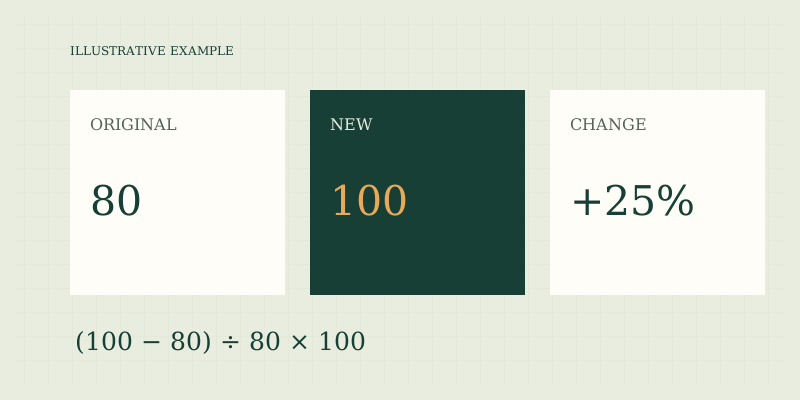
To find percentage change from a positive original value, subtract the original from the new value, divide by the original, and multiply by 100. The order matters. The result measures the difference relative to where you started, so reversing the comparison usually changes both its sign and its magnitude.
Calculate a change step by step
Consider an illustrative monthly household expense that moves from $80 to $100. The dollar difference is $20. Dividing $20 by the original $80 gives 0.25. Multiplying by 100 gives a 25% increase. These are teaching amounts, not a claim about current household costs or inflation.
| Step | Arithmetic | Meaning |
|---|---|---|
| Find the difference | 100 − 80 = 20 | Dollar increase |
| Compare with the original | 20 ÷ 80 = 0.25 | Increase per original dollar |
| Express per hundred | 0.25 × 100 = 25% | Relative increase |
If the expense instead drops from $100 to $80, the difference is −$20 and the denominator is $100. The answer is −20%. The same dollar gap therefore produces a 25% increase in one direction and a 20% decrease in the other. Neither result is inconsistent.
Use the correct comparison period
The original and new values should be comparable observations. A monthly total and a weekly total cover different periods. A price for one package and a price for a larger package may need conversion to a common price per unit before calculating the change. A count that includes new locations is not necessarily comparable with a previous count covering fewer locations. For a hypothetical subscription, compare the recurring service charge with the same recurring service charge, or compare full invoices with full invoices and explain the difference. If an introductory discount ends, describe that event rather than assuming the percentage captures a general price trend. If service features change, the arithmetic remains correct but the comparison may not describe an equivalent purchase.
Why equal rises and falls do not cancel
An illustrative value of 100 rises 20% to 120. A later 20% decrease applies to 120, not 100, and subtracts 24. The ending value is 96. In multiplier form, 100 × 1.2 × 0.8 = 96. To return from 120 to 100 requires a decrease of 20 ÷ 120 × 100, or about 16.6667%. This is why adding successive percentage changes can be misleading. Multiply the successive change factors to find the cumulative effect. A 10% increase followed by another 10% increase multiplies the original by 1.1 × 1.1 = 1.21, giving a cumulative 21% increase. The second increase is calculated on an already larger base.
Zero and negative starting values
When the original is zero, the standard formula divides by zero. Describe the absolute change instead: “increased from 0 to 12” is informative without an invented percentage. The site's change mode rejects zero. If both values are zero, the absolute change is zero, but the relative-change formula still has a zero denominator. Negative originals also create interpretation problems. Moving from a loss of 10 to a gain of 5 is an improvement in the underlying balance, yet mechanically dividing by −10 can produce a negative percentage. Different contexts use different conventions. This calculator intentionally requires a positive original rather than choosing a convention that might mislead. For financial reporting, follow the reporting standard and explain the absolute figures.
Distinguish changes in amounts from changes in rates
If a completion rate moves from 40% to 50%, it has risen 10 percentage points. Its relative increase is (50 − 40) ÷ 40 × 100 = 25%. Always write the unit of the reported change. “Up 10%” does not clearly communicate a ten-point increase. A larger percentage change also does not necessarily mean a larger absolute change. An increase from 2 to 4 is 100%, while an increase from 1,000 to 1,100 is 10%. The second adds many more units. When comparing changes across different bases, report original amounts or absolute differences alongside the percentages.
A reporting checklist
- Name the earlier and later periods.
- Use consistent units, coverage, and definitions.
- Show the original, new, and absolute difference.
- Divide by the original positive amount.
- Round only the final percentage and state the precision.
- Avoid interpreting a calculated change as proof of a cause.
Use the percentage calculator in change mode to reproduce the arithmetic. Return to percentage basics to choose a different operation. Read percentage points for rates and reverse percentages when the original is unknown.
Keep the sign visible
If you report only the magnitude, add the word increase or decrease. A signed percentage copied without a label can otherwise lose its direction in a chart or message.
FAQ
Can a decrease exceed 100%?
A nonnegative quantity cannot fall by more than 100% without becoming negative. Signed balances can cross zero, but their interpretation needs care and may call for absolute amounts instead.
What if the values are rounded?
Use the most precise comparable observations available. Calculating from already rounded numbers can change the final percentage, especially when the original is small.
Does percentage change establish inflation?
No. A percentage change in one hypothetical expense is simply that expense's change. Broader inflation measures use defined baskets, coverage, and statistical methods outside this calculator.
Sources
- Bureau of Labor Statistics: calculating percent changes — reference for the original-value denominator and comparable periods.
- Sources and methods — implementation and review scope.
Put the method to work.
Open calculator ↗