
FIELD NOTES / Dates & days
Inclusive date counting: when both endpoints count
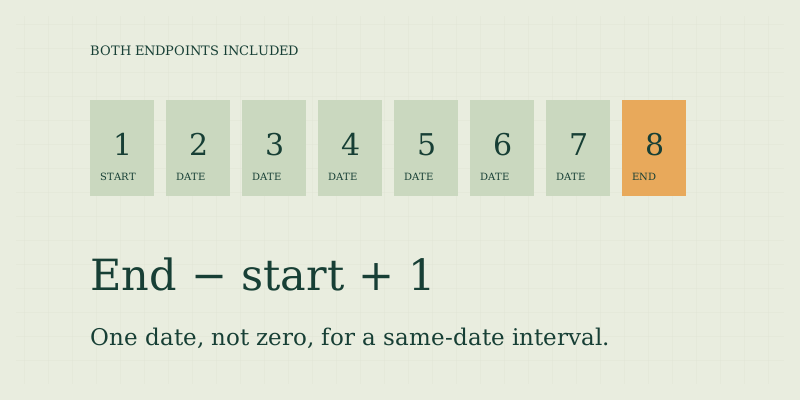
For an interval whose start and end dates both count, subtract the start from the end in calendar days and add one. An illustrative event running January 1 through January 8, 2026 covers eight dates. An elapsed interval between the same dates is seven days. Always identify which count the question requires.
Picture the dates, not just the gap
List January 1, 2, 3, 4, 5, 6, 7, and 8. There are eight labels but only seven gaps between neighboring labels. Inclusive counting counts labels; elapsed counting counts gaps. This is a useful mental model for checking a result that seems one day too short or too long.
| Illustrative dates | Elapsed days | Both dates included |
|---|---|---|
| Jan 1 to Jan 1, 2026 | 0 | 1 |
| Jan 1 to Jan 2, 2026 | 1 | 2 |
| Jan 1 to Jan 8, 2026 | 7 | 8 |
The “add one” rule assumes the end is on or after the start and that every calendar date counts. It should not be applied mechanically to a weekday total or an interval with other excluded dates. Those require checking whether each endpoint itself qualifies.
Inclusive weekday counts need a filter
Take an illustrative interval from Friday, January 2 to Monday, January 5, 2026. Both endpoints included gives four calendar dates: Friday, Saturday, Sunday, and Monday. Removing Saturday and Sunday leaves two weekdays. Excluding the start instead leaves only Monday, or one weekday. Now consider Saturday, January 3 through Sunday, January 4. The inclusive calendar count is two, but the inclusive Monday–Friday count is zero. Adding one to an elapsed weekday result would be wrong here because the added start date is a Saturday. The date calculator handles endpoint inclusion before applying its weekday filter.
Know when inclusive counting fits
An inclusive count may help describe the number of calendar dates on an event schedule or the daily boxes in a tracking sheet. It does not automatically determine billing nights, rental duration, attendance requirements, or payment entitlements. Those quantities may follow different definitions even when they use the same starting and ending dates. For a trip, the number of nights between arrival and departure often corresponds to date boundaries rather than dates touched, but actual accommodation terms control billing. Do not infer a charge from the inclusive total alone. Similarly, a pass described as lasting several days may have exact activation and expiry rules that a date-only count cannot establish.
State the convention in your result
Prefer “eight calendar dates, January 1 through January 8 inclusive” over simply “eight days” when ambiguity is possible. If the result is elapsed time between date boundaries, write “seven calendar days between January 1 and January 8, excluding the starting date.” The extra wording prevents a future reader from repeating the calculation under a different assumption. When sharing a screenshot, keep the endpoint checkbox visible or include the convention in the accompanying message. A numerical result copied without settings loses an important part of its meaning. For internal records, retain both dates, the selected mode, and the inclusion choice rather than only the total.
Avoid combining overlapping intervals twice
If one inclusive interval runs January 1–8 and another runs January 8–15, adding their counts counts January 8 twice. The first contains eight dates and the second contains eight dates, but their combined span from January 1 through January 15 contains fifteen dates, not sixteen. This matters when combining reporting periods or dividing a calendar into adjacent blocks. You can use nonoverlapping intervals, subtract the shared date where appropriate, or adopt a half-open convention in a data system. The site's elapsed mode uses start excluded and end included, which allows adjacent intervals to combine without duplicating their shared boundary in the same way.
An endpoint checklist
- Read whether the question says “through,” “after,” or explicitly “including.”
- Do not assume those words override a contract's defined counting rule.
- Identify any shared dates when joining intervals.
- Apply the endpoint choice before removing weekends.
- Keep time-of-day questions out of a date-only total.
- Confirm official deadlines separately.
Use the inclusion checkbox in the date calculator to compare totals. Return to date-counting basics for the overall method. Read weekdays and business days for holiday limitations and adding days for the distinction between day zero and day one.
Use a labeled calendar row
For a short interval, draw one box for each date and mark the endpoints explicitly. Then cross out any dates excluded by the chosen rule. Counting the remaining boxes gives a transparent check on the software result. This is especially useful when a schedule has been split across two pages or when a shared boundary could be counted twice. Keep the drawing as a counting aid rather than treating it as evidence of an institution's deadline policy.
FAQ
Should I always add one to a date difference?
No. Add one only when counting all calendar dates with both endpoints included. Elapsed-day questions already have the intended result without the extra day.
What if the end date is earlier?
This tool rejects the interval. Correct a reversed entry or use add/subtract mode with a negative offset if you intend to move backward.
Does “inclusive” remove holidays?
No. Inclusion describes endpoints. Holiday removal is a separate calendar rule that this tool does not implement. Monday–Friday mode excludes weekends only.
Sources
- US Naval Observatory: Leap Years — Gregorian calendar rule used for date validity.
- Sources and methods — tool endpoint and weekday conventions.
Put the method to work.
Open calculator ↗